Turn on the attachment warning so Webmail reminds you to attach a file whenever you mention one in a message. This guide shows where to enable the setting.
Step 1 — Open Settings
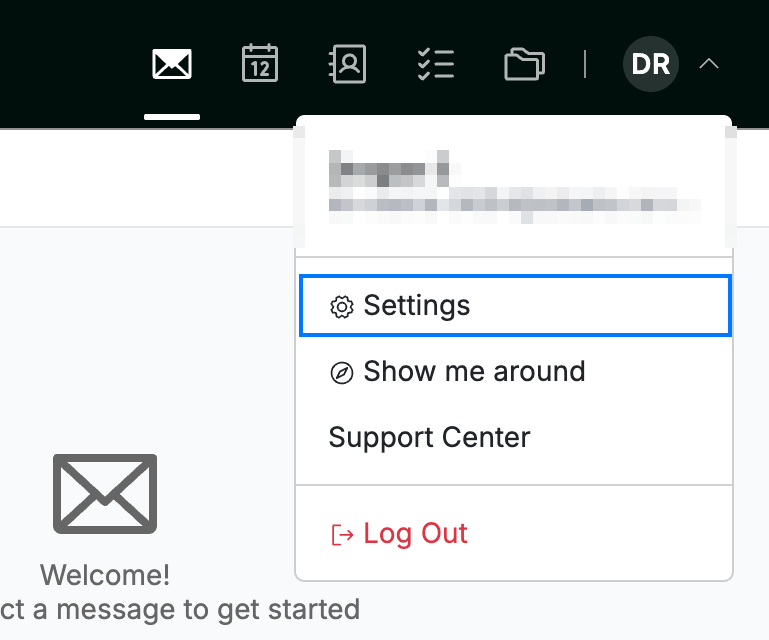
Click your avatar in the top-right corner and select Settings.
Step 2 — Select Message Composing
Select Message Composing from the settings sidebar.

Step 3 — Turn on Attachment Warning
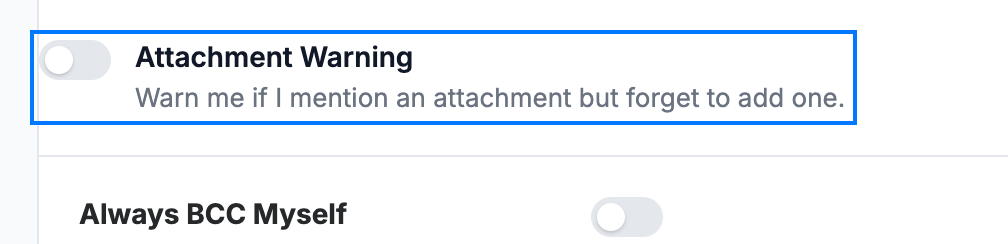
Click the Attachment Warning toggle to switch it on. Webmail then alerts you before sending if you mention an attachment in the message but haven't added a file.
Tip: The warning is triggered by words such as "attached" or "attachment" in your message body, so it catches the most common slip-ups.
Step 4 — Click Save Updates
Click Save Updates to apply your change.

Explore our other guides to get the most out of Webmail.