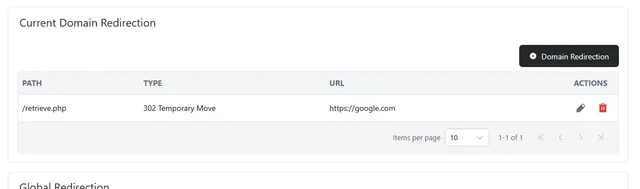
The domain forwarding application will allow you to forward traffic from your domain to another URL, this can be configured to trigger on accessing the page via the index file or can be set to trigger on a specific file being accessed.
Withing this screen you can also configure a catchall email address.
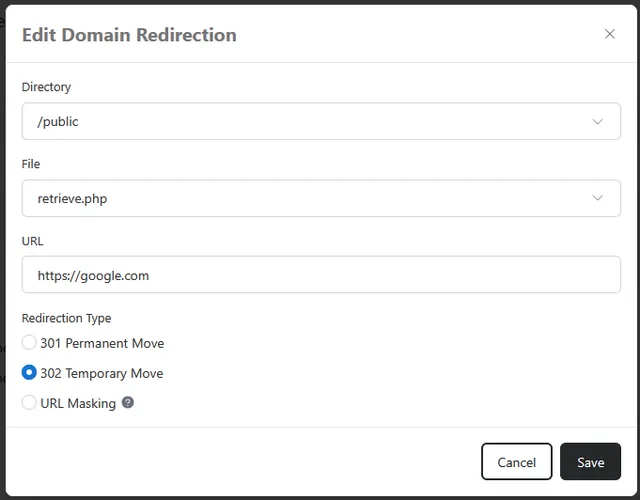
To remove or edit an existing redirect, click the small trashcan or pencil icon to the right of the redirection, selecting the edit option will allow you to alter the destination URL and redirection type before re-saving.
Selecting the Trashcan will prompt you to confirm the deletion of the redirection.
Types of Redirection:
301 Permanent Move: Use this when the move is permanent. Browsers and search engines remember it, and search engines move your rankings to the new address
302 Temporary Move: Use this when the move is short term. Search engines keep the original address listed, since you plan to switch back.
URL Masking: Shows the content of the destination URL while your own domain stays in the address bar. Some websites block this and will show a blank page, and masked pages are not picked up well by search engines.
Global Redirect: Sends all visitors to one version of your domain, either with or without "www". For example, anyone who visits yourdomain.com is sent to www.yourdomain.com. Using one version keeps your site consistent and helps search engines treat it as a single site. Choose No Global Redirection to let both versions load on their own
Catch All Email: Forwards email sent to any address at your domain that doesn't exist to the address you enter here. For example, a message sent to a mistyped address like sales@ instead of sale@ still reaches you. Catch-all addresses can collect a lot of spam, so only use one if you need it.