TO CREATE A CATCHALL:
A catch all email acts as a global landing pad for emails sent to non existent addresses under the domain e.g if you have the email sales@example.com but someone sends an email to sale@example.com the sender will receive a bounce back message but the email will be directed to the catch all email address
Setting the catch all email through the mail manager is preformed through clicking on global email settings, once in the following screen
1 - select the domain you wish to set the cachall for from the drop down menu
2 - enter the email address you want catch all emails to be sent to in the Forwarding address field
3 - Click save
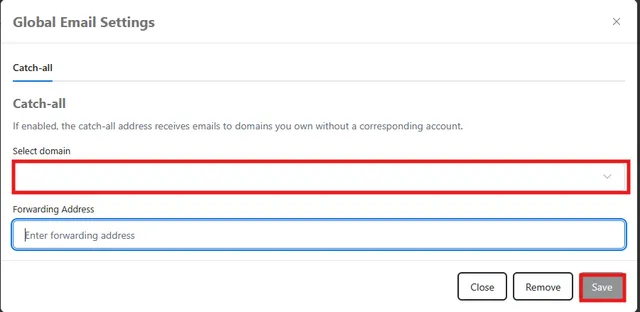
To Disable the catch all email for a domain follow the same steps but choose the "Remove" option instead of save
Note: You can only set one catch-all email address per domain. The existing email address that you set as your catch-all can be either an external address (e.g. a hotmail account) or one of your domain's email regular accounts.