Locking and Unlocking Your Domain
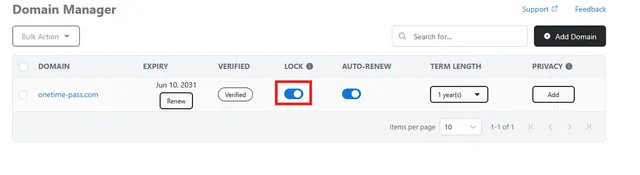
To lock or unlock your domain, navigate to the Domain Manager and use the toggle switch in the LOCK column next to the domain you wish to manage.
Troubleshooting Domain Lock Issues
If the toggle switch does not successfully unlock your domain, this may be due to one of the following reasons:
- 60-Day Registrar Lock: Your domain may be subject to a mandatory 60-day registrar lock following an update to the WHOIS contact details.
- Lock Status Desynchronization: The lock status displayed in the Domain Manager may not match the actual lock status of the domain.
Resolving a Lock Status Desynchronization
To correct a desynchronized lock status, follow these steps:
- In the Domain Manager, click the domain name displayed in blue to open its details page.
- Locate the lock toggle at the top of the page and check its current status.
- Compare this status with the toggle shown in the LOCK column of the Domain Manager.
- If the two statuses do not match, adjust the toggle on the domain details page so that it matches the status shown in the Domain Manager.
- Return to the Domain Manager and try locking or unlocking the domain again.
Once both lock statuses are synchronized, the toggle in the Domain Manager should function as expected.