The purpose of the block list is to block specific email domains/addresses from subscribing to certain lists. Since customers can subscribe to email lists, this feature allows you to maintain the list to your specifications.
TO ADD To The Block List:
1. Click the pencil icon next to the email list you wish to edit and select the "Blocked List" tab
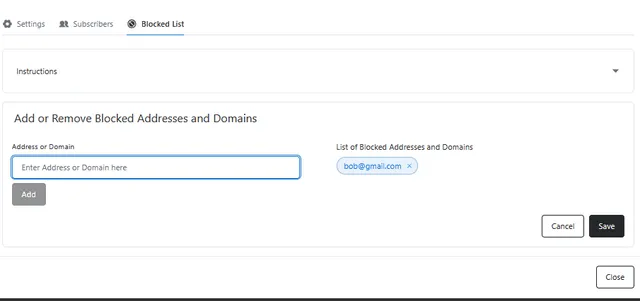
2. under the Address or Domain section, enter the full email address to block a specific user or enter a domain name to block any email address from that domain then hit the Enter key, e.g: entering gmail.com will prevent any @gmail.com user from subscribing, where entering bob@gmail.com only prevents bob from subscribing to the list.
3. To remove an entry from the block list simply click the small x next to the entry you wish to remove.
once happy with the current blocked list, click the save button to finalize the changes