You can choose to forward a domain via the Domain Forwarding application
First you will need to decide the type of redirect you want to use, Global redirects are a quick way to force all site traffic to one version of the domain either with or without www., Catch-all allows you to set up a catchall email address
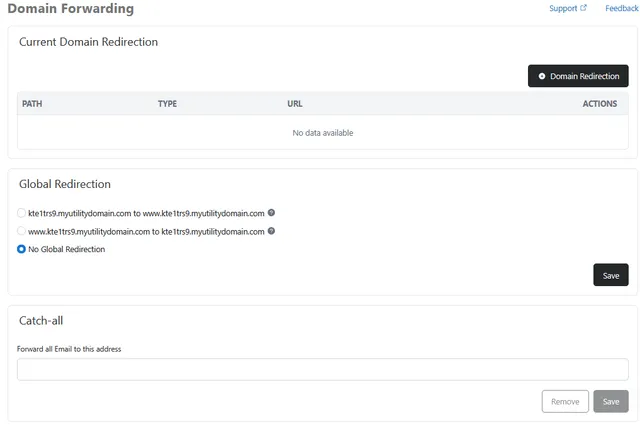
Or By clicking on the Domain Redirection button you can create a redirect to a specified URL
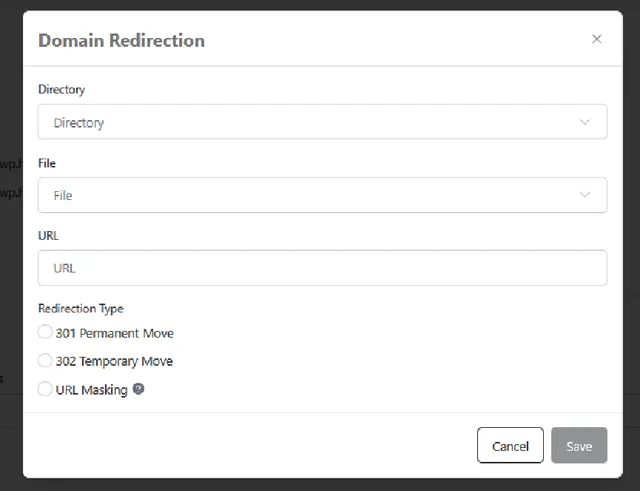
- Directory - Unless you only want the redirect to happen when a spicific folder is accessed pick public
- File - Unless you only want the redirect to happen when a specific file is accessed i.e domain.tld/shop.html accesses the file shop.html in your public folder, if choosing this only visitors accessing the domain.tld/shop page will be redirected
- URL - enter the full web url of the website you want the page to redirect to. i.e https://domain.tld
- 301 Permanent Move - Redirect takes place for new visitors to the site and also takes place when someone accesses the site through a browser bookmark / favorite link.
- 302 Temporary Move - Redirects new visitors to the site but not bookmarks / favorites.
- URL Masking – redirects to the new page but does not change the URL so site visitors still see your domain name and URL after the redirect
- To confirm the forward just click save, and the forwarding should take affect within a few minutes time.