1. Click Mail Aliases.
2. Next, select the Settings  icon (in the same row as the domain you want to work on).
3. Choose Manage Alias.
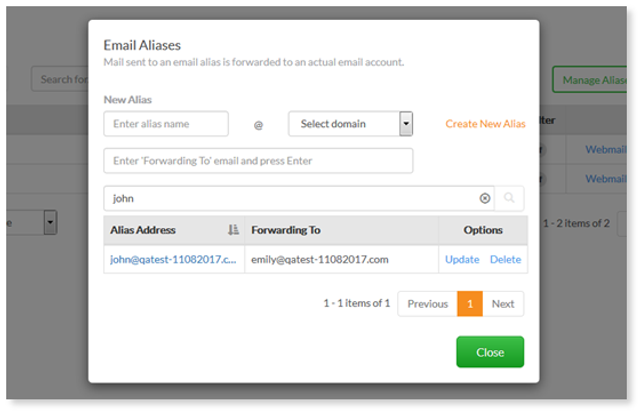
4. Complete the following in the pop-up screen:
Alias name – enter the alias account name
Select domain – select a domain on which you want to create the alias account
Forwarding To email – enter the email address you would like emails to be forwarded to and press Enter
Note: You may enter more than one forward to email address.
5. Click Create New Alias . The new alias will be listed on the same page.
6.
You can also…
- Search for an alias – search for a specific alias by entering the alias address
- Update - can remove, change or add ‘forwarding to’ email(s)
- Delete – delete an alias