The steps for installing the Comodo EV SSL Certificate are similar to the Comodo SSL Certificate with the exception that more information will be required to order this certificate.
1. Purchase the SSL Certificate through the shop tab.
2. Once the purchase is complete, select Install from the main dashboard.
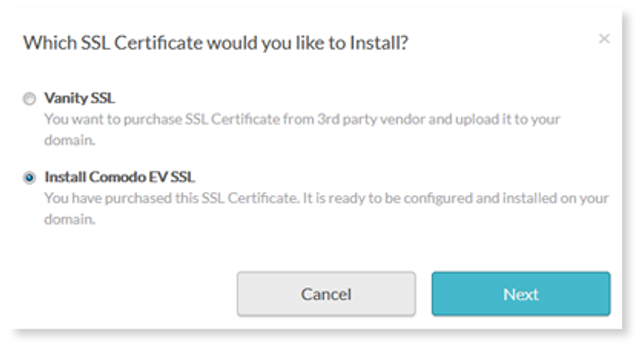
3. Choose the type of SSL Certificate you want to install and select Next .
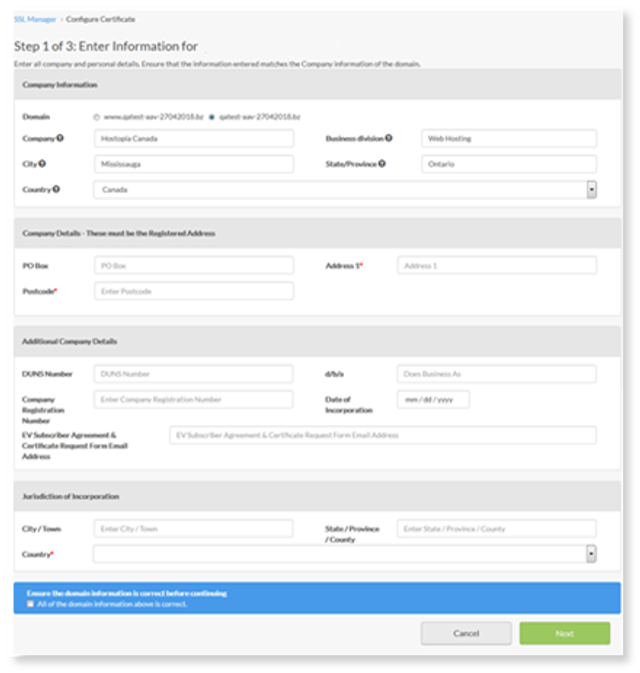
4. Enter your company information, select Next .
As per Comodo SSL documentation listed here the EV SSL process is as follows,
The EV Enrollment Form
This is among the most straightforward steps in the entire EV SSL validation process. It's one sheet. You fill it out to show the Certificate Authority that you are an employee in good standing and that you are authorized to be making this purchase.
Organization Authentication
During this step the CA will use government registration information to verify that your company or organization is a legally registered entity that is active in its registered location.
Operational ExistenceThe Certificate Authority checks to see that your company or organization has been operational for three or more years. If your business isn't three years old, you will need to furnish registration documents or a Professional Opinion Letter.
Physical Address
The Certificate Authority verifies that your business has an established physical presence in the country or state that it's registered in. The CA will not accept PO Boxes of off-shore companies.
Note: In addition to the installation a DNS update is required. Once the installation is complete, it will take 48 hours for the IP address to become active. After 48 hours have lapsed you will need to update DNS settings.
Telephone Verification
Another one of the simplest steps in the validation process, the Certificate Authority will check a trusted third-party directory to verify that your organization has a working phone number.
Domain Authentication
The Certificate Authority needs to verify that you're the rightful owner of the registered domain. It can do this via file-based authentication, email or cName.
Final Verification Call
Finally, the Certificate Authority is going to call the organization contact (whoever completed the enrollment form) to verify the details of the order.