This section includes information about the following:
- Account Drop-Down
- Primary Menu
- Secondary Menu
Account Drop-Down
The Account drop-down is a menu located on the right-hand side of the top navigation bar.
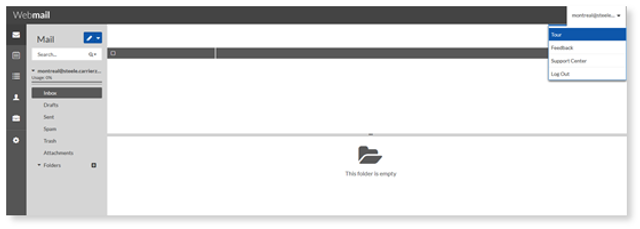
From here, you can access any of the following:
Tour: Opens a pop-up tour of Webmail. You can choose of five main email components and the tour will walk you through the features for that component.
Feedback Message: Opens an email, addressed to the Webmail team with Webmail 7.0 Feedback subject.
Support Center: Opens the online help in a new tab.
Log Out: Logs you out of Webmail.
Primary Menu
The primary navigation is statically located on the left-hand side of the screen. Inside this navigation bar, you can access all of Webmail’s major feature-sets, such as the following:
 Inbox
Inbox
 Calendar
 Taskbox
 Contacts
 Briefcase (Online Storage)
 Preferences
Secondary Menu
The secondary menu is located to the right of the primary menu. Options within the secondary menu change depending on the primary menu selection.